
Liquor Inventory Control System Software
One Program. Complete Liquor Control.
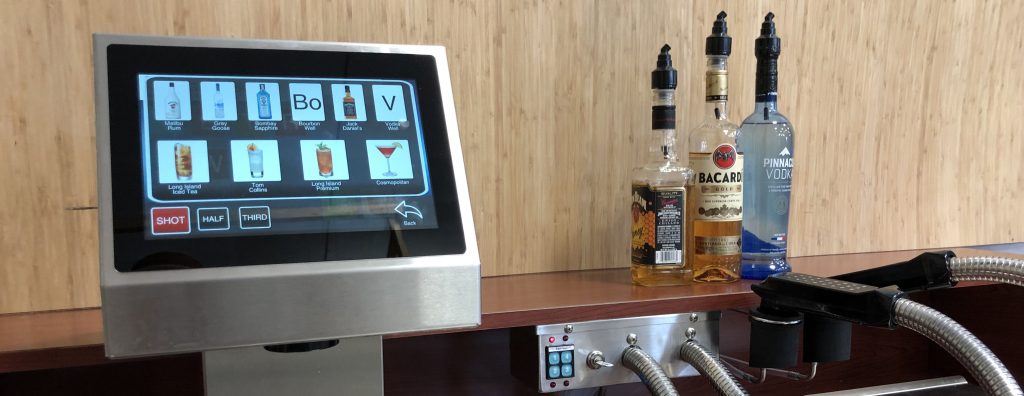
Easybar Beverage Management Software brings every dispenser into a single control platform. Brands, cocktails, pour sizes, and PLU numbers are configured in one program and can be quickly copied across stations, creating a consistent operating standard throughout the system.
Management can schedule automatic readings, combine data into consolidated reports, or review individual readings by shift or dispenser type. Customized reporting provides dispensing activity, cost and retail analysis, and inventory usage, with information broken down by brand, drink, and station or combined into systemwide totals.
A single program controls the system and gives management the information needed to understand what is being poured, where it is being poured, and what it means to the operation.
One Interface for Your Liquor Operation
With our liquor inventory control system, you get:
- Station Configuration: Configure brands, cocktails, pour sizes, and PLU numbers in one program, then quickly copy that setup to additional stations.
- Automatic Readings: Schedule readings by time, day, or week, then combine them into consolidated reports or review individual readings by shift or dispenser type.
- Calibration: Enter the actual amounts poured, and Easybar Beverage Management Software automatically adjusts pour sizes and cocktails.
- Remote Control: Generate and view reports remotely, enable or disable stations from the computer, and allow Easybar technicians to remotely review or adjust the system when needed.
- Comprehensive Reports: Track dispensing activity, cost and retail analysis, and inventory usage by brand, drink, station, or across the entire system.
- POS Interface: Drinks can be registered directly through the point of sale, allowing poured drinks to be reconciled through the POS for sales and inventory tracking.

A Partnership from Design Through Day-to-Day Operation
Software solves nothing installed on its own. Our team works directly with your design group and general contractor during new construction and remodels, integrating the wiring, the pump room, and the reporting network into the property's plans from the earliest drawings, rather than retrofitting them once the walls are up. For a replacement project, we plan the swap around your operating hours, so a bar stays open through the changeover rather than going dark to bring in new equipment.
Once a system goes live, training happens on-site, not through a manual left on a shelf. Our technicians train bartenders and servers on the equipment itself and train management on the software separately, then leave a property with what it needs to onboard new hires long after the install crew has gone home. From there, a national network of service technicians handles calibration and repair.
Designed for the Venues That Can't Operate on a Clipboard
A casino floor running dozens of service points can't manage liquor inventory off memory and a clipboard, and neither can a stadium concourse during a sellout or a convention center running three events at once. At that volume, a single point of variance stops reading as a rounding error and starts reading as a line item that a CFO asks about by name. Easybar's liquor control software provides a beverage director with the same real-time view of every pour on a property, which is why enterprise operators bring Easybar in during new construction planning, and why properties running an older or unreliable system call us during a remodel instead of living with a blind spot.
Industries We Serve
Explore how Easybar's liquor control software and dispensing systems fit the operational demands of your venue:
Contact us today to see how our Easybar dispensing systems and our software operate hand in hand to give you property-wide control over every pour.
No. Our technicians handle setup, calibration, and configuration as part of the installation, and remote access lets Easybar view or adjust a system without sending someone on-site for every issue. Your team logs in to run reports and manage stations, not to maintain the platform underneath them.
You can duplicate the configuration designed for one station directly to a new station or property, meaning no one re-enters the same brand list and pour sizes from scratch every time the footprint grows.
It isn't an add-on. We build the software and the dispensing hardware in the same operation, so the pour data comes straight from the hardware rather than an estimate layered on top of a generic POS plug-in. That's also why a beverage director can trust the same numbers, regardless of which station the pour came from.

James Nicol
Purchasing a New Draft Beer System
Discover seven factors to consider before buying a draft beer system.
James Nicol
How Would You Spend an Extra $130,000 In Revenue?
Explore the potential cost savings of a liquor management system.

James Nicol
What Are Liquor Dispensing Systems?
Take an in-depth look at liquor dispensing systems.